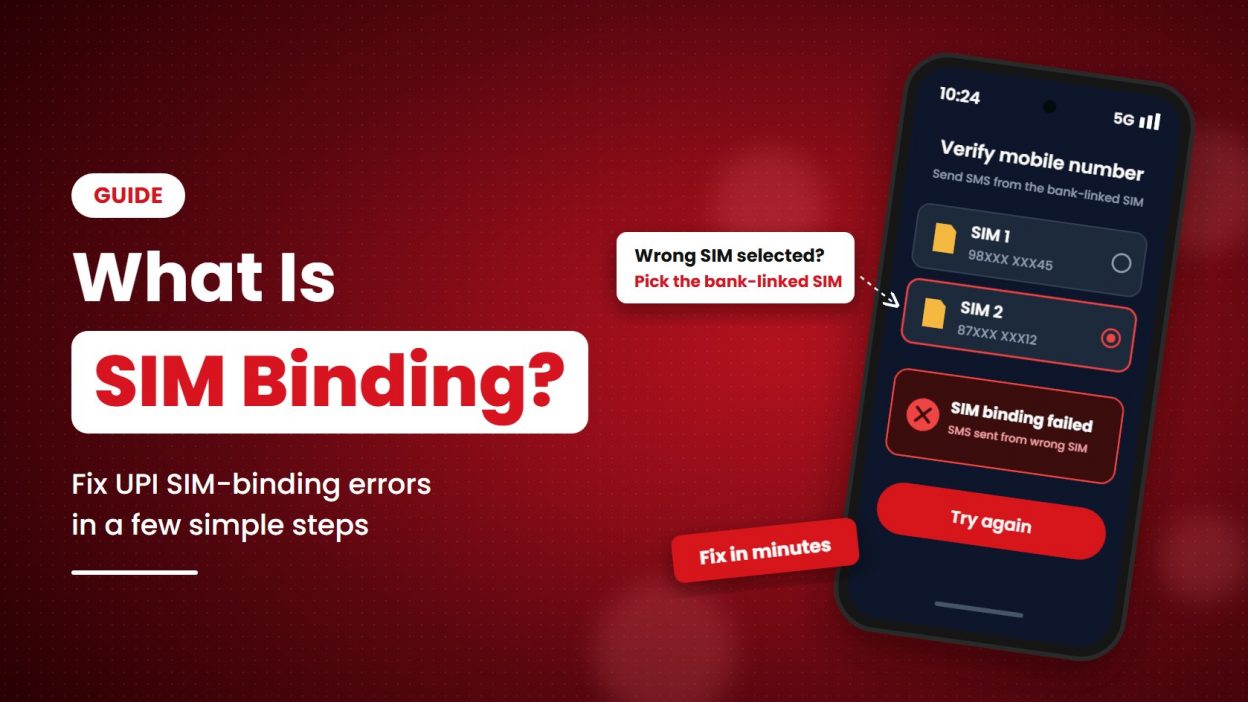
Have you opened Google Pay, PhonePe, Paytm or your banking app and seen “SIM binding failed”?
- 1 What is SIM binding?
- 2 How does SIM binding work?
- 3 SIM binding in UPI and mobile banking
- 4 Why does SIM binding matter?
- 5 SIM binding vs device binding: what is the difference?
- 6 “SIM binding failed”: what it means and how to fix it
- 7 What does “all SIM-binding limits exhausted” mean?
- 8 What SIM binding cannot do
- 9 Frequently asked questions
- 10 Conclusion
This message can appear when you add a bank account, register for UPI or set up the app on a new phone. It can also happen if your phone sends the verification SMS from the wrong SIM or cannot send it at all.
In many UPI apps, this process is called device binding. The app checks that the phone and mobile number you are registering match. This guide explains what the check means, why it matters and what you can try if it fails.
What is SIM binding?
In UPI, SIM binding usually means checking that the mobile number linked to your bank account is being used on the phone where you are registering the UPI app.
The app commonly checks this by sending an SMS from your phone using the SIM linked to your bank account. This helps connect your UPI registration to the right number and device. The NPCI’s UPI FAQ says you may need to register again if you change your SIM, phone or UPI app.
Think of it like a check at the entrance. The app checks that you have access to the registered mobile number before it completes setup. This check is different from your UPI PIN, which you use to approve a payment when required.
SIM binding meaning in one line: It is a security check that links your UPI app setup to your registered mobile number and phone.
How does SIM binding work?
In many UPI apps, SIM binding checks whether the mobile number linked to your bank account is active on the phone you are setting up. The exact steps can vary by app, but a common SMS-based process works like this.
1. Select the SIM linked to your bank account
If your phone has two SIMs, choose the number connected to your bank account.
2. Send a verification SMS
The app asks your phone to send an SMS from the selected SIM. This helps verify that you can use the registered number on that phone.
3. Let the app check your number
The app or payment service checks whether the SMS came from the correct number.
4. Complete the setup
If the check is successful, the app registers your phone for UPI.
What is Silent Mobile Verification?
Some newer verification methods use mobile network information to check the link between your number, SIM and phone. Reports about NPCI Circular OC-238 say Silent Mobile Verification has been added to the UPI device-binding framework. Whether you see this option depends on your app and its implementation.
SIM binding in UPI and mobile banking
UPI apps use a phone and number check when you register or register again. This does not mean you must complete a SIM check every time you make a payment. Your UPI PIN is a separate security step for transactions that require it.
For example, Google Pay says the SMS used to verify a bank account must be sent from the number linked to that account. Its troubleshooting guide also explains that a dual-SIM user must send the SMS from the correct SIM.
| Check | What it means |
| Correct mobile number | The number used for verification should match the number linked to your bank account. |
| Correct SIM selected | On a dual-SIM phone, choose the SIM linked to your bank account for the outgoing SMS. |
| Active network | Your phone needs a working mobile network to send the verification SMS. |
| Outgoing SMS service | Your plan must allow you to send SMS. Some prepaid plans may not include outgoing SMS. |
| App instructions | Follow the steps shown in your UPI app. The process may differ between apps and phones. |
These steps relate to UPI registration. The Department of Telecommunications (DoT) has also issued a separate SIM-binding direction for certain communication apps, including WhatsApp. That direction requires the app to remain linked to its active SIM. The current compliance date is 31 December 2026, with requirements expected to apply from 1 January 2027, as of 29 October 2026. Read our guide to the SIM-binding rule for WhatsApp Business.
Why does SIM binding matter?
SIM binding adds a check during UPI registration. It helps confirm that the person setting up the app has access to the mobile number linked to the bank account. It can make it harder to register an account from a different phone using only someone else’s details.
It is one security measure, not a guarantee against fraud. The Ministry of Home Affairs reported 24,02,579 financial cyber-fraud complaints in 2025, with ₹22,495 crore reported as lost. These are complaint figures, and the government notes that the data can change.
SIM binding does not replace your UPI PIN or other safety checks. Never share your UPI PIN, one-time password (OTP) or banking password with anyone.
SIM binding vs device binding: what is the difference?
The terms are often used together in conversations about UPI. Device binding refers to linking an app or account to a particular phone. SIM verification helps confirm that the registered mobile number is available on that phone.
| Term | What it checks | When you may see it |
| SIM verification | Whether the app can verify the number linked to your bank account | During UPI registration or re-registration |
| Device binding | Whether the UPI app is registered on the phone being used | During setup, or after changing your phone or app |
| DoT’s continuous SIM binding direction | Whether a covered communication app remains linked to its active SIM in the device | Under the separate direction for certain messaging and communication apps |
“SIM binding failed”: what it means and how to fix it
A “SIM binding failed” message usually means the app could not complete its number or device check. The message alone does not prove that your account or money has been compromised.
| Possible problem | What to try |
| The wrong SIM was selected | Select the SIM linked to your bank account for the verification SMS. |
| Your phone cannot send SMS | Send a normal test SMS. If it fails, check your plan or contact your mobile operator. |
| The signal is weak | Move to an area with better mobile coverage and try again. |
| The phone has two SIMs | Set the registered SIM as the outgoing SMS SIM, or select it when prompted. |
| The app was closed during setup | Open the app again and follow its instructions from the beginning. |
| The app needs an update | Update it from the official app store, then try again. |
| Your SIM was recently replaced | Check that calls and outgoing SMS work. Contact your operator if the SIM is not fully active. |
If the app still shows an error, contact the app’s support team or your bank. Avoid repeatedly trying different settings if the app shows a waiting period.
What does “all SIM-binding limits exhausted” mean?
This message means you have reached the app’s limit for verification attempts. The limit can differ between services.
For example, Google Pay says NPCI allows three SMS verification attempts within 24 hours. It advises users to wait 24 hours after the last attempt before trying again. The same guide says another attempt during the waiting period can extend the block. Check your app’s own instructions before retrying.
Before you try again, check these three things:
- Is the SIM linked to your bank account selected?
- Can your phone send an outgoing SMS?
- Does your phone have a mobile network connection?
What SIM binding cannot do
SIM binding adds a security check, but it cannot prevent every kind of fraud.
- It cannot stop every SIM-swap fraud. If a fraudster manages to get control of your number through a SIM replacement or account takeover, the app may still need other checks to identify the risk.
- It cannot protect an unlocked phone by itself. Use your phone’s screen lock and the security options available in your UPI app.
- It cannot stop someone from tricking you. Do not share your UPI PIN or OTP, and do not approve a payment request unless you understand it.
If your phone suddenly shows “No Service” and you did not request a SIM replacement, contact your mobile operator through its official channel.
Frequently asked questions
Is SIM binding the same as a SIM swap?
No. SIM binding is a security check used during app registration. A SIM swap is when someone fraudulently gets control of another person’s mobile number through a replacement SIM or similar process.
Is SIM binding mandatory for UPI?
UPI apps use device and mobile-number verification during registration. The exact steps can vary by app. If you change your phone, SIM or UPI app, you may need to register again.
Does SIM binding work with an eSIM?
It may work if your eSIM has the number linked to your bank account and your UPI app supports that setup. Follow the instructions from your app and mobile operator.
Can I complete SIM binding on Wi-Fi?
It depends on the app and phone. Many UPI apps need to send an SMS from the registered SIM, so Wi-Fi alone may not be enough. Keep the mobile network available and follow the app’s instructions.
How do I remove SIM binding?
You usually cannot switch off the app’s registration checks. If you change your phone, SIM or UPI app, you may need to register again. The NPCI UPI FAQ explains that users may need to re-register after these changes.
How long does SIM binding take?
It often takes less than a minute if your phone can send the verification SMS and the correct SIM is selected. The time can vary by app, network and bank.
What should I do if the app blocks my attempts?
Wait for the period shown by the app. Do not keep retrying during the waiting period, as some services may extend the block. Check the app’s help page or contact its support team if the problem continues.
Conclusion
SIM binding is a check that helps a UPI app verify your registered mobile number and phone during setup. It is not the same as entering your UPI PIN, and it does not guarantee protection from every type of fraud.
If verification fails, check the selected SIM, outgoing SMS service, network and app instructions. If you recently changed your SIM or phone, you may need to register again. If the issue continues, contact your bank, app support team or mobile operator.