Want to check your call history from last month but can’t find it on your phone?
- 1 What Do You Need Before Checking Your Call History?
- 2 How Can You Check Call History on Jio, Airtel, Vi and BSNL?
- 3 How to Check Jio Call History Using the MyJio App
- 4 How to Check Airtel Prepaid Call History Using SMS
- 5 How to Check Airtel Postpaid Call History
- 6 How to Check Vi Call History Using the Vi App
- 7 How to Check BSNL Call History
- 8 How to Open a Password-Protected Call History PDF
- 9 Call History Not Downloading? Common Problems and Solutions
- 10 Can You Get Call History Older Than 6 Months?
- 11 Can You Check Someone Else’s Call History?
- 12 Conclusion
Your phone normally saves details of recent incoming, outgoing, and missed calls. However, older call records may disappear when you delete your call logs, reset your phone, or switch to a new device.
The good news is that you may still be able to get those records from your mobile operator.
Jio, Airtel, Vi, and BSNL provide different ways to access your call history. Depending on your operator, you can download a call statement, request an itemised bill, or receive call details by email.
In this guide, you’ll learn how to check and download your own call history on Jio, Airtel, Vi, and BSNL, including the steps to open password-protected call history PDFs and fix common download problems.
What Do You Need Before Checking Your Call History?
Before requesting your call history, keep a few things ready to make the process easier.
- Your registered mobile number: Keep the SIM card active and available because you may need to receive an OTP or send an SMS.
- Your operator’s mobile app: Jio users need the MyJio app, while Vi users can use the Vi app. Airtel prepaid users can request call details through SMS.
- An active email address: Some operators send call history statements or bills directly to your registered email address.
- Details required to open the PDF: You may need your date of birth, registered name, or mobile number digits to open a password-protected statement.
Important: You should only request call records for a number registered in your name or one you are authorised to manage. As explained in Vi’s official call history guide, telecom operators restrict access to protect customer privacy.
How Can You Check Call History on Jio, Airtel, Vi and BSNL?
Each telecom operator has a different process for providing call history.
Here’s a quick comparison to help you choose the right method.
| Mobile Operator | How to Check Call History | Details Available | Charges |
| Jio | MyJio app or Jio website | Outgoing calls and usage details | Free |
| Airtel Prepaid | Send an SMS to 121 | Chargeable call details | Free |
| Airtel Postpaid | Download monthly bill | Detailed billing records | Included in bill |
| Vi | Vi app using Email Bill | Incoming and outgoing call details | Free |
| BSNL Postpaid | Request an itemised bill | Call-wise billing details | Paid add-on |
The information shown in your statement may vary depending on your operator, billing plan, and available records.
Below are the steps for each network.
How to Check Jio Call History Using the MyJio App
If you use a Jio SIM, you can check your outgoing call history through the MyJio app without visiting a Jio store.
Jio provides a feature called My Statement, which allows you to view details of your calls, SMS usage, mobile data consumption, and recharge history.
According to Jio’s official support page, you can request a statement for any 30-day period within the last six months.
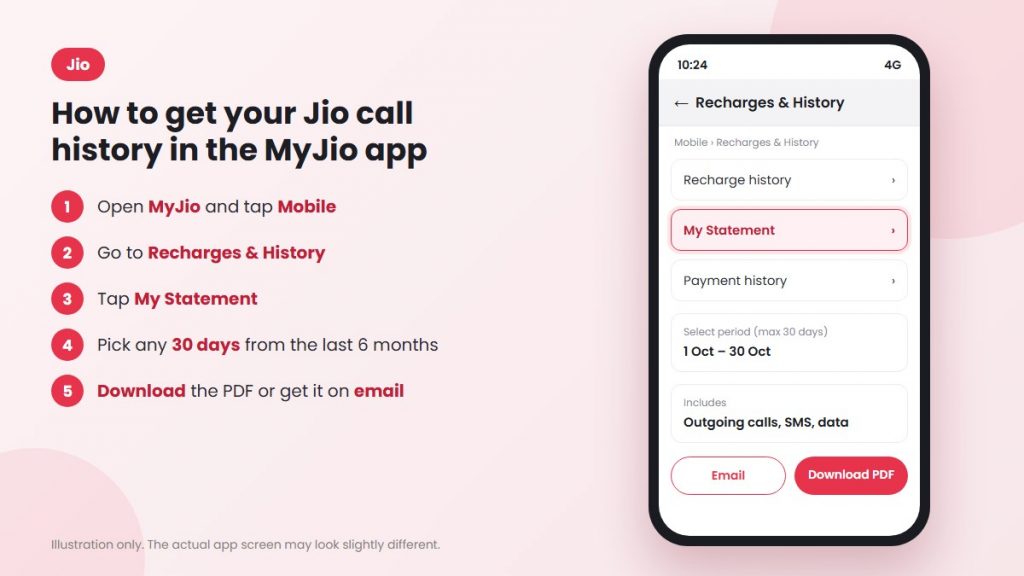
Steps to Download Jio Call History
- Open the MyJio app: Launch MyJio on your smartphone and log in using your registered Jio mobile number.
- Go to the Mobile section: On the home screen, select Mobile to access your Jio account details.
- Open Recharges & History: Find and tap Recharges & History.
- Select My Statement: Tap My Statement to view your available usage records.
- Choose the date range: Select the starting and ending dates for the call history you want. You can download records for up to 30 days at a time.
- Download or email the statement: Tap Download PDF to save the file on your phone or choose Email to receive it in your registered inbox.
Can You Download 6 Months of Jio Call History?
Yes. Jio allows you to access statements covering the previous six months.
However, you cannot download the entire six-month period in a single statement. You need to select and download separate 30-day periods.
Note: Jio’s regular usage statement includes outgoing call details but does not provide a complete list of incoming calls.
How to Check Airtel Prepaid Call History Using SMS
Airtel provides an SMS-based method that allows you to request an e-bill containing eligible call details for a selected month.
According to Airtel’s official call history guide, you can send a request to 121 and receive the statement at your email address.
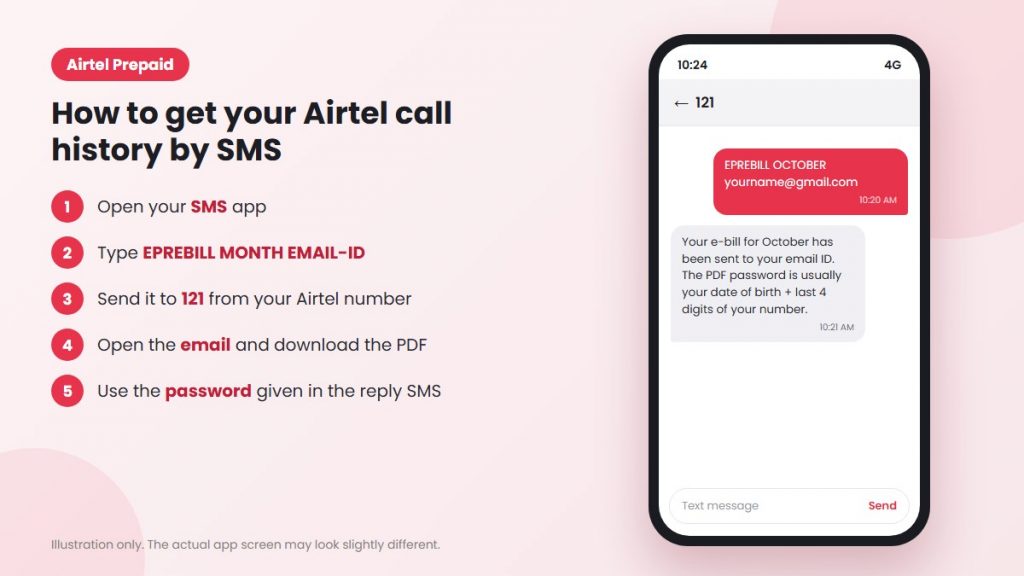
Steps to Download Airtel Prepaid Call History
- Open your messaging app: Launch the default SMS app on the phone with your Airtel SIM.
- Enter the request format: Type EPREBILL, followed by the month and your email address.
For example:
EPREBILL OCTOBER yourname@gmail.com - Send the SMS to 121: Make sure you send the message from the Airtel number whose call history you want.
- Check Airtel’s reply: You should receive a response confirming the request and providing information about the PDF password.
- Open your email: Check your inbox, find the e-bill sent by Airtel, and download the attached PDF.
- Open the PDF: Enter the password provided or specified by Airtel to view the available call details.
Can You Get 6 Months of Airtel Call History?
You can request monthly statements separately, subject to Airtel’s available records and service rules.
For example, if you need call history for six months, you must send a separate SMS request for each required month.
Remember that the Airtel prepaid e-bill mainly includes chargeable call details, so it may not show every incoming, outgoing, or missed call.
Can You Check Airtel Call History Through the Airtel Thanks App?
You can also use the Airtel Thanks app to find help with your call history request.
- Open the Airtel Thanks app.
- Go to the Help section.
- Start a support chat.
- Type Call History.
- Follow the instructions provided.
How to Check Airtel Postpaid Call History
If you have an Airtel postpaid connection, you can access available call details through your monthly bill.
Unlike prepaid users, postpaid customers generally receive a bill containing usage and billing information.
Steps to Check Airtel Postpaid Call History
- Open the Airtel Thanks app.
- Log in with your registered Airtel postpaid number.
- Open the billing or account section.
- Select the month for which you need the bill.
- Download the monthly bill and check the available call details.
The amount of call information included may depend on your billing format and whether itemised details are available.
How to Check Vi Call History Using the Vi App
Vi (Vodafone Idea) customers can request their call history through the official Vi app.
The app includes an Email Bill feature that allows eligible users to request monthly call statements.
According to Vi’s official call history guide, the available statement can include incoming and outgoing call details.
However, before requesting a statement for the first time, you may need to register and verify your email address.
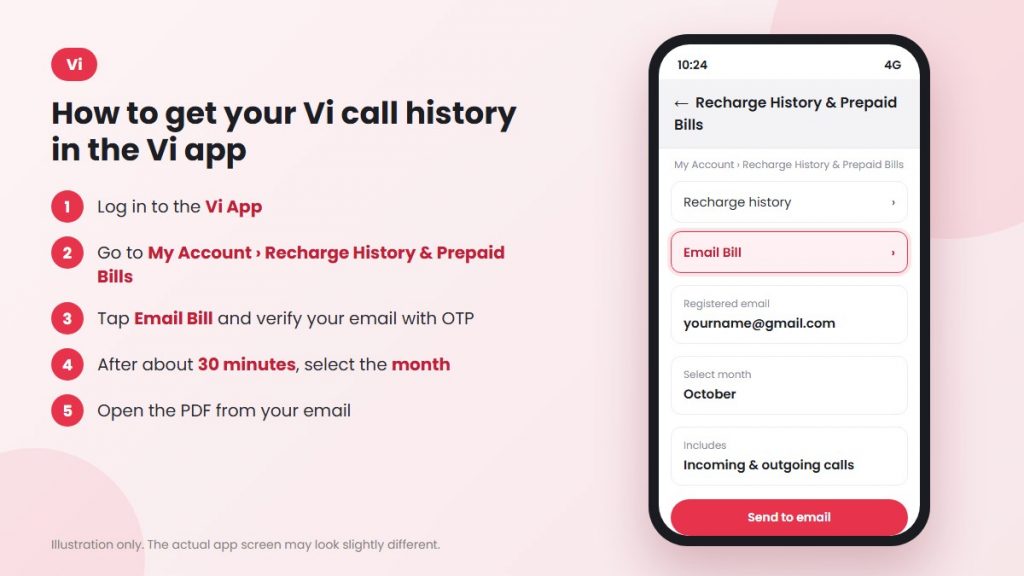
Step 1: Register Your Email Address in the Vi App
If you haven’t registered your email address, follow these instructions:
- Open the Vi App and log in with your registered Vi mobile number.
- Go to My Account.
- Select Recharge History & Prepaid Bills.
- Tap Email Bill.
- Enter your email address and complete the OTP verification process.
- Allow approximately 30 minutes for your email registration to become active.
You generally need to complete this registration only once.
Step 2: Download Your Vi Call History
After registering your email address, follow these steps:
- Open the Vi App.
- Navigate to My Account → Recharge History & Prepaid Bills.
- Select the Email Bill tab.
- Choose the month for which you want the call history.
- Tap the option to send the statement to your email.
- Open your email inbox and download the PDF attachment.
Can You Check Incoming and Outgoing Call History on Vi?
Vi’s official guidance indicates that its call history statement can provide details of incoming and outgoing calls.
However, the exact information included may depend on the type of statement and available operator records.
Note: Once your email is successfully registered, you can usually skip the email verification steps when requesting another statement.
How to Check BSNL Call History
BSNL provides a different process for accessing call details compared with Jio, Airtel, and Vi.
Instead of offering the same self-service statement download options, BSNL mainly provides detailed call information through its billing and customer support services.
The process also depends on whether you have a prepaid or postpaid connection.
How to Get BSNL Postpaid Call History
BSNL postpaid customers can request an itemised bill, which provides detailed information about individual calls.
According to BSNL’s official FAQ, detailed call-wise billing is available as a paid service.
To request it:
- Contact BSNL customer care or visit your nearest BSNL customer service centre.
- Ask for detailed call-wise billing for your postpaid number.
- Confirm the applicable charges and available billing period.
- Complete any required verification.
- Follow BSNL’s instructions to receive your itemised bill.
How to Get BSNL Prepaid Call History
If you use a BSNL prepaid SIM, you can contact BSNL customer care or visit a customer service centre to ask whether call details are available for your number.
You may need to verify that the SIM belongs to you before the operator can process your request.
Can You Check BSNL Bills Online?
Yes. You can use the BSNL Selfcare app to access supported account and billing services.
However, viewing a normal bill is not necessarily the same as downloading a complete call history statement.
How to Open a Password-Protected Call History PDF
After downloading your call history, you may notice that the PDF asks for a password before opening.
Telecom operators use password protection to help prevent unauthorised access to personal call information.
The password format varies depending on the operator.
| Operator | How to Find the PDF Password |
| Airtel | Usually based on your date of birth and the last four digits of your mobile number. Check Airtel’s reply SMS for the exact format. |
| Vi | First two letters of the registered SIM owner’s name in lowercase, followed by the last four digits of the mobile number. |
Example: How to Open a Vi Call History PDF
Suppose your Vi SIM is registered under the name Rahul, and your mobile number ends in 4521.
Your PDF password would be:
ra4521
After entering the correct password, you can open the file and view the available call details, such as the call date, time, phone number, and duration.
Important: Password formats may change. Always follow the instructions provided in your operator’s email or SMS if they differ from the examples above.
Call History Not Downloading? Common Problems and Solutions
Sometimes, you may face problems while requesting or downloading your call history.
Here are some common issues and how to resolve them.
1. Call History Email Not Received
If you requested a statement but haven’t received the email, check your Spam, Junk, and Promotions folders.
Also, confirm that you entered the correct email address.
If the email is still missing, try submitting the request again through the official app or contact your operator.
2. Airtel Call History SMS Not Working
If Airtel does not accept your SMS request, check whether you’ve entered the command correctly.
Use the format:
EPREBILL MONTH EMAIL-ID
Make sure there is a space between each part and that the message is sent to 121 from your Airtel number.
3. Vi Call History Month Not Showing
If you recently registered your email in the Vi app, the system may need some time to complete the registration.
Wait approximately 30 minutes and check again.
You can also close and reopen the Vi app before retrying.
4. Call History PDF Password Not Working
If your PDF isn’t opening, double-check the password format.
For Airtel, refer to the password instructions in the reply SMS.
For Vi, use the first two letters of the registered name in lowercase, followed by the last four digits of the mobile number, if that is the format provided.
5. Older Call History Not Available
Your mobile operator may provide statements only for a limited period.
If you’re unable to select the required month, contact customer support to find out whether older records can be requested.
Can You Get Call History Older Than 6 Months?
Getting call records older than six months may be difficult through the usual mobile apps or self-service options.
For example, Jio’s regular statement feature allows users to download records from the last six months, with a maximum of 30 days per statement.
Other operators may have different limits depending on their billing systems and service rules.
If you need older call records for a legal, financial, or personal matter, contact your mobile operator directly.
They can explain whether the records are available, what verification is required, and whether a formal request is necessary.
Keep in mind: An operator retaining call records does not automatically mean those records are available for customers to download through an app.
Can You Check Someone Else’s Call History?
You cannot normally access another person’s private call records without proper authorisation.
Telecom operators restrict access to protect customer information and prevent misuse.
If a family member or employee has authorised you to manage their mobile connection, the operator can explain the requirements for obtaining records.
Be cautious of websites or applications claiming they can show the call history of any mobile number.
As Vi explains in its call history guide, such services may be unreliable and can put your personal information at risk.
Never share your OTP, account password, or other sensitive details with an unknown website offering call history services.
Conclusion
Checking your call history is usually simple when you know the correct method for your telecom operator.
Whether you use Jio, Airtel, Vi, or BSNL, you can request the available call records through the official app, SMS service, monthly bill, or customer support.
Here’s a quick recap:
| Operator | Method to Check Call History |
| Jio | MyJio → Mobile → Recharges & History → My Statement |
| Airtel Prepaid | SMS EPREBILL MONTH EMAIL-ID to 121 |
| Airtel Postpaid | Download your monthly bill |
| Vi | Vi App → My Account → Recharge History & Prepaid Bills → Email Bill |
| BSNL | Request an itemised bill or contact BSNL customer care |
Remember that call history availability depends on your operator and the type of statement provided. Some records include outgoing calls only, while others may provide additional details.
For personal use, your operator’s official app or support service is generally the best place to start.
For businesses managing large volumes of customer calls, a centralised call tracking and reporting system can be a more practical solution.
Disclaimer: Jio, Airtel, Vi (Vodafone Idea), and BSNL are trademarks of their respective owners. CallerDesk is not affiliated with these operators. The steps and availability described in this guide are based on operator information and may change. Screenshots used in the article are illustrations; actual application screens may differ.