Before cloud telephony became common, businesses needed a way to handle several phone calls at the same time. ISDN helped by allowing multiple calls over a single digital telephone connection, so businesses did not need a separate line for every call.
- 1 What Is ISDN and How Does It Work?
- 2 What Are the Types of ISDN?
- 3 ISDN vs. PSTN vs. DSL vs. VoIP
- 4 Is ISDN Still Used Today?
- 5 Why Are Businesses Moving Away From PRI Lines?
- 6 What Are the Alternatives to ISDN and PRI?
- 7 How Can You Move From PRI to Cloud Telephony?
- 8 How Can CallerDesk Help?
- 9 Conclusion
For example, a BRI connection could handle two calls at once, while an E1 PRI connection could handle up to 30 calls at the same time.
Today, businesses have other ways to manage customer calls. Internet-based phone systems make it easier to route calls, connect teams and handle more customer enquiries as a business grows.
ISDN (Integrated Services Digital Network) is a telephone technology that carries voice and data over a digital network. Some businesses still use ISDN-based PRI lines, but many are switching to newer options such as SIP trunking and cloud telephony.
What Is ISDN and How Does It Work?
ISDN stands for Integrated Services Digital Network. It was developed to make telephone communication more flexible by transmitting voice and data digitally instead of relying entirely on traditional analog telephone connections.
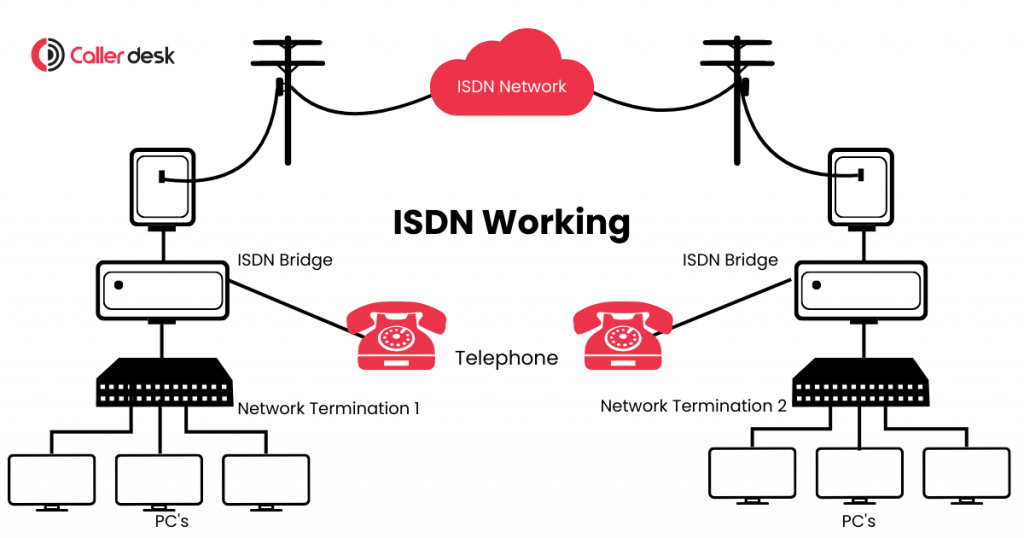
An ISDN connection uses two types of channels:
- B-channel (Bearer channel): Carries voice calls or data. Each channel typically provides 64 kbps of capacity.
- D-channel (Signalling channel): Carries the information required to establish, manage and end calls.
When someone makes a call, the telephone network uses the D-channel to process the request and assigns an available B-channel to carry the conversation. When the call ends, the channel becomes available for another connection.
This arrangement allows an ISDN connection to handle multiple calls, depending on the number of available B-channels.
Businesses typically need compatible equipment, such as an ISDN telephone system or a PBX/EPABX, to use the service.
What Are the Types of ISDN?
ISDN has two main types: Basic Rate Interface (BRI) and Primary Rate Interface (PRI). The primary difference is how many simultaneous calls each connection can support.
| Feature | BRI | PRI (E1) |
| B-channels | 2 | 30 |
| Total interface rate | 144 kbps | 2.048 Mbps |
| Maximum simultaneous calls | 2 | 30 |
| Typical use | Small offices and older home connections | Offices, hospitals, hotels and call centres |
BRI: Basic Rate Interface
BRI was designed for homes and small offices. It provides two B-channels, allowing users to make two calls simultaneously or use one channel for a call and another for data.
Both channels can also be combined for up to 128 kbps of data capacity when the equipment and service support it.
PRI: Primary Rate Interface
PRI was designed for businesses that needed to manage more calls through a central telephone system.
In India, a PRI line commonly uses the E1 configuration, which provides 30 B-channels. When all channels are available for calls, the connection can support up to 30 simultaneous conversations.
For example, a call centre can connect its PRI line to an EPABX and distribute incoming calls among sales, customer support and other departments.
However, the PRI line provides calling capacity; features such as IVR, call recording and reporting generally depend on the connected telephone system or additional software.
ISDN vs. PSTN vs. DSL vs. VoIP
ISDN, PSTN, DSL and VoIP are related to telephone or internet services, but they work in different ways. Let’s understand the difference with a simple example.
| Technology | How it works | Example |
| PSTN | Uses the traditional telephone network to connect calls. | A home landline used to call a friend. |
| ISDN | Uses digital channels to carry voice and data. | An office using a PRI connection to handle multiple customer calls at once. |
| DSL | Provides internet access through suitable copper telephone wiring. | A home or office using a DSL broadband connection to browse the internet. |
| VoIP | Uses the internet to make and receive voice calls. | A customer support team making calls through an internet-based phone system. |
What Is the Main Difference Between These Technologies?
The main difference is how each technology handles calls or internet access.
A traditional PSTN landline generally supports one call at a time on a single line. ISDN can handle multiple calls through digital channels on one connection. For example, an office using an E1 PRI connection can handle up to 30 simultaneous calls.
DSL serves a different purpose. It provides internet access through telephone wiring rather than managing multiple phone calls like ISDN.
VoIP uses an internet connection to make and receive calls. For example, a business can use a VoIP phone system to direct customer calls to sales or support teams without relying on traditional ISDN lines.
This is why many businesses consider VoIP, SIP trunking and cloud telephony when they want a more flexible way to manage customer calls.
Is ISDN Still Used Today?
Yes, some businesses still use ISDN, particularly those with existing PRI connections and older PBX or EPABX systems. However, its use has declined as telecom operators move towards IP-based communication.
ISDN is also being phased out in several countries, although there is no single worldwide shutdown date.
For example:
- United Kingdom: Traditional fixed telephone services, including ISDN, are being migrated to digital alternatives, with the transition expected to be completed by the end of January 2027 for most customers.
- Japan: NTT East and NTT West have announced that their INS-Net services will end on 31 December 2028. The services stopped accepting new or relocation applications on 31 August 2024.
These dates apply to the specified markets and services. Businesses in India should confirm the availability and future support of their existing PRI connections directly with their telecom provider.
Why Are Businesses Moving Away From PRI Lines?
PRI lines can still handle business calls, but they may not be the best fit for every business as its communication needs change.
1. Limited Call Capacity
An E1 PRI connection supports up to 30 simultaneous calls. If a business regularly receives more calls than its available channels can handle, it may need to upgrade or add more capacity.
2. Dependence on Physical Equipment
PRI lines usually connect to an on-site PBX or EPABX system. Businesses may need compatible hardware, regular maintenance and technical support to keep the system running.
3. Difficult to Scale and Support Remote Teams
Adding more employees, opening a new office or supporting remote workers may require extra equipment and configuration. This can make it harder to adjust the phone system as the business grows.
4. Additional Setup for Advanced Features
Features such as IVR menus, call recording, call reports and CRM integration may depend on the existing phone system. Some businesses may need extra software or services to use these features.
5. Changing Business Communication Needs
Businesses increasingly need phone systems that work across locations, connect with other business tools and adapt to changing call volumes. Depending on the setup, traditional PRI systems may require more effort to support these needs.
PRI lines can still be suitable for businesses with existing equipment and predictable call volumes. Before switching, businesses should compare their current call requirements, maintenance costs, equipment condition and telecom provider’s plans with the benefits of newer options.
What Are the Alternatives to ISDN and PRI?
Businesses looking to replace traditional PRI connections commonly consider SIP trunking or cloud telephony. The right option depends on whether they want to retain their existing phone system or move to a hosted solution.
1. SIP Trunking
SIP trunking carries business calls over an IP network and can connect a compatible PBX to a telephone service.
It can help businesses move away from traditional PRI circuits without necessarily replacing their entire phone system. However, older PBX equipment may need a suitable interface or gateway.
SIP trunking can be a practical option for organisations that want to modernise their telephone connectivity while retaining compatible equipment.
2. Cloud Telephony
Cloud telephony provides business calling features through a platform hosted by a service provider. Instead of depending entirely on an on-site telephone exchange, businesses can manage their calling setup through an online dashboard.
Depending on the provider and plan, features may include:
- Virtual business numbers
- IVR menus and call routing
- Call recording and call history
- Call reports and analytics
- CRM integrations
- Calling access through supported mobile apps or browsers
Cloud telephony can help businesses manage calls across departments and locations without relying entirely on a traditional office-based telephone system.
SIP Trunking vs. Cloud Telephony
| Requirement | SIP trunking | Cloud telephony |
| Retain a compatible PBX | Often possible | Depends on the platform |
| Reduce on-site hardware dependence | Not necessarily | Often possible |
| Centralised online call management | Depends on the setup | Commonly available |
| Support remote teams | Depends on the phone system | Commonly supported |
| Best suited for | Businesses modernising existing phone systems | Businesses seeking flexible, centrally managed calling |
Before choosing either option, businesses should check network reliability, call capacity, number portability, security, support and applicable telecom requirements.
How Can You Move From PRI to Cloud Telephony?
Switching from PRI to cloud telephony takes planning. A few simple steps can help businesses avoid missed calls and keep customer communication running smoothly.
1. Check Your Existing Phone System
Make a list of your current phone numbers, PRI connections, extensions and PBX or EPABX equipment. This will help you understand what needs to be moved to the new system.
2. Understand Your Call Volume
Check how many calls your business handles at busy times. This helps you choose a plan that can manage your incoming and outgoing calls without issues.
3. Check If You Can Keep Your Existing Numbers
Contact your telecom provider to confirm whether your current business numbers can be retained or transferred to the new service. Ask how long the process may take.
4. Choose the Right Phone System
Compare SIP trunking and cloud telephony based on your existing equipment, budget and business needs. SIP trunking may work with a compatible PBX, while cloud telephony can provide phone features through an internet-based platform.
5. Test the New System Before Switching
Test incoming and outgoing calls, IVR menus, call transfers, recordings and any required integrations. Also check whether alarms or other devices depend on your existing PRI connection.
6. Switch After Everything Is Ready
Once testing is complete, confirm the call routing and migration plan with your provider. Move to the new system only when you are confident that calls can reach the right people.
A well-planned migration can help businesses retain their phone numbers, reduce service interruptions and make the transition to cloud-based communication easier.
How Can CallerDesk Help?
Moving from PRI lines to cloud telephony can give businesses a simpler way to manage customer calls, direct enquiries to the right teams and support employees working from different locations.
CallerDesk offers cloud telephony features such as virtual business numbers, IVR and call routing. These tools can help businesses organise incoming calls and manage customer enquiries through a single platform.
Before switching, businesses can compare CallerDesk’s features with their current phone system, call volume and integration needs to decide whether it suits their requirements.
Conclusion
ISDN helped businesses handle multiple phone calls through a single digital connection. BRI was suitable for setups needing fewer calls at once, while PRI allowed larger offices to manage more simultaneous calls.
Today, businesses can also use SIP trunking and cloud telephony to manage calls with greater flexibility. If you’re planning to move away from PRI, consider your call volume, existing equipment, business phone numbers and provider’s service plans before choosing a replacement.
For businesses looking to modernise their calling setup, cloud telephony is one option worth evaluating alongside their existing system.